If you’ve just gotten behind the wheel of a Tesla Model 3, you might be wondering how to open the glove box. Unlike traditional cars, Tesla has a unique way to access this handy storage space.
Knowing the exact steps will save you time and frustration, especially when you need to grab important documents or small items quickly. You’ll discover simple, clear instructions to open your Model 3 glove box effortlessly. Keep reading to unlock this smart feature and enjoy a smoother driving experience.
Locate The Glove Box
Locating the glove box in a Tesla Model 3 is simple and quick. Knowing its exact place helps you access it without any hassle. This section guides you to find the glove box easily.
Check The Passenger Side Dashboard
The glove box is on the front passenger side. Look below the air vent and above the footwell. It blends with the dashboard design but stands out by its outline.
Identify The Glove Box Panel
Notice a rectangular panel with a subtle seam. This panel is the glove box door. It does not have a traditional handle.
Observe The Touchscreen Controls
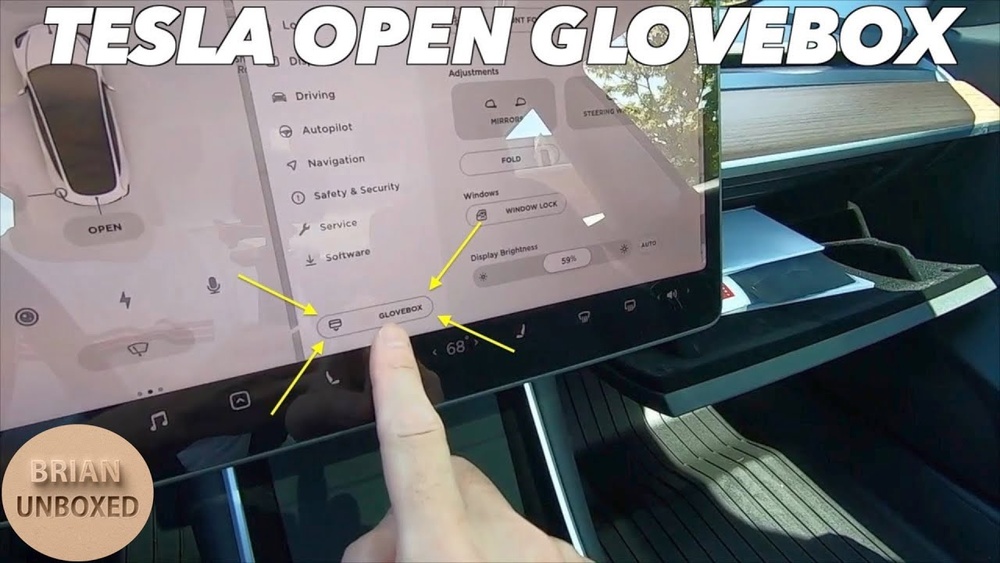
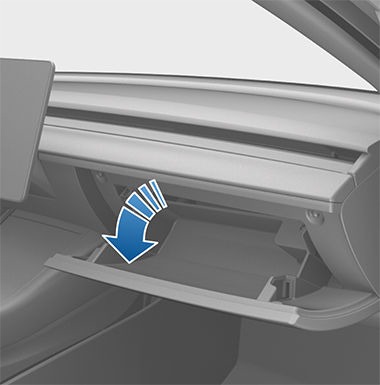
In Tesla Model 3, the glove box opens electronically. You will not find a physical latch. The control to open it is on the center touchscreen.
Credit: www.notateslaapp.com
Use The Touchscreen Control
The Tesla Model 3 offers a modern way to open the glove box using the central touchscreen. This method is simple and quick. It avoids the need for physical buttons or keys. The touchscreen control puts the glove box just a tap away.
Using the touchscreen also keeps the interior clean and sleek. It fits well with Tesla’s tech-forward design. Let’s explore how to find and open the glove box through the screen.
Accessing The Glove Box Menu
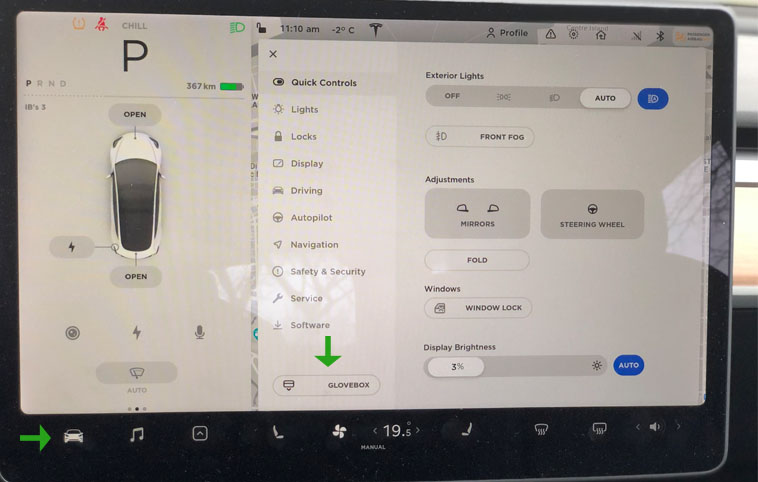
Start by looking at the main touchscreen in your Model 3. On the home screen, find the car icon. Tap this icon to open the vehicle settings menu. Inside this menu, you will see several options. One of these is the glove box control. It is usually labeled clearly for easy access.
Opening With A Single Tap
After locating the glove box option, just tap it once. The glove box will unlock and pop open automatically. No need to pull or press any physical buttons. This one-tap action makes it quick and convenient. You can close the glove box manually after use.
Manual Release Option
The Tesla Model 3 glove box usually opens with the touchscreen. But sometimes, you need to open it manually. This option is useful if the touchscreen does not work or the car battery is low. The manual release lets you access the glove box without power.
Knowing how to find and use the manual release can save time and stress. It is simple to do and does not require tools. Follow the steps below to open the glove box by hand.
Finding The Manual Release
The manual release is behind the glove box panel. First, open the glove box as far as possible using the touchscreen or power button. Look inside the upper part of the glove box frame. You will see a small lever or tab, often red or orange. This is the manual release handle.
Sometimes, you may need to gently pull down or push the glove box inward to access the lever. The lever is easy to spot because it contrasts with the glove box color. Keep your fingers ready to grab it once visible.
Steps To Manually Open
Step one: Pull the manual release lever firmly. It will unlock the glove box latch. Step two: Slowly pull the glove box door open with your other hand. Do not force it open; it should release smoothly. Step three: Hold the door open to access contents safely.
Step four: Close the glove box door by pushing it back until it clicks. The manual release will reset automatically. Use this method only when power access is not possible. Practice once to remember the process.

Credit: www.youtube.com
Troubleshooting Common Issues
Troubleshooting common issues with the Tesla Model 3 glove box can save time and frustration. Understanding typical problems helps in quick fixes. This section covers frequent concerns and how to address them.
Glove Box Not Responding
The glove box may not open if the button or touchscreen is unresponsive. First, check if the car is in park mode. The glove box lock usually works only when parked. Sometimes, a simple restart of the car system can fix this issue.
Try pressing the glove box button firmly on the touchscreen. If it still does not open, check for any physical obstructions. Dirt or debris can block the latch. Clean the area gently to ensure smooth operation.
Software Update Impact
Software updates can change how the glove box operates. After an update, some settings might reset or behave differently. Check the update notes from Tesla for any changes related to the glove box.
If problems start after an update, restart the car to refresh the system. Sometimes, waiting a few hours allows the software to settle. Contact Tesla support if issues continue beyond that.
Safety Tips When Accessing
Accessing the Tesla Model 3 glove box requires care. Safety matters to avoid damage and injury. Follow simple steps to stay safe while opening the glove box.
Check The Car’s Status
Make sure the car is parked and turned off. This prevents accidental movements or electrical issues. Keep your hands dry to avoid slipping.
Use The Touchscreen Correctly
The glove box opens via the touchscreen. Press the correct button gently. Avoid pressing too hard to protect the screen.
Keep Fingers Clear
Clear fingers before closing the glove box. Avoid pinching your skin or nails. Open slowly to watch for obstacles.
Store Items Safely Inside
Place items neatly inside the glove box. Avoid overloading to prevent damage. Heavy objects can cause the glove box to break.
Credit: tesloid.com
Frequently Asked Questions
How Do You Open Tesla Model 3 Glove Box?
To open the Tesla Model 3 glove box, tap the glove box icon on the touchscreen. The glove box will then automatically unlock and open.
Can I Open Tesla Model 3 Glove Box Manually?
No, the Tesla Model 3 glove box opens electronically only. You must use the touchscreen control to access it.
Is There A Way To Lock Tesla Model 3 Glove Box?
Yes, you can lock the glove box by enabling the glove box PIN code in the settings menu for added security.
What If Touchscreen Doesn’t Open Tesla Model 3 Glove Box?
If the touchscreen is unresponsive, reboot it by holding both scroll wheels on the steering wheel until it restarts. Then try again.
Conclusion
Opening the Tesla Model 3 glove box is simple and quick. Just follow the steps carefully. Knowing this helps you access important items easily. No need to struggle or get frustrated. Practice a few times to feel confident. Enjoy the convenience of your Tesla’s smart design.
Keep this guide handy for future reference. Now, you can focus more on driving and less on searching. Easy, fast, and stress-free—just how it should be.