Ready to make your rides smarter and more connected? Installing the Quad Lock Bike Mount is the perfect way to keep your phone secure and accessible while you pedal through Austin’s streets or hit the trails.
You might be wondering if it’s complicated or time-consuming—but don’t worry, this guide breaks down the installation into simple, clear steps anyone can follow. By the end, you’ll have your phone mounted safely, ready to navigate, track your workout, or catch those scenic shots hands-free.
Stick with me, and you’ll see just how easy it is to upgrade your biking experience today.
Credit: www.quadlockcase.com
Quad Lock Bike Mount Types
The Quad Lock bike mount offers several types to fit different bike styles and rider preferences. Each mount type secures your phone firmly while providing easy access during rides. Choosing the right mount depends on your bike’s design and where you want your phone positioned.
Understanding each mount type helps with proper installation and usage. Below are the main Quad Lock bike mount types that riders commonly use.
Handlebar Mount
The handlebar mount attaches directly to your bike’s handlebar. It places your phone right in front of you for quick glances. This mount is simple to install and works well on most bike bars. It keeps your phone stable and easy to reach while riding.
Stem Mount
The stem mount fits on the stem of your bike, just below the handlebar. This position is slightly lower and closer to the bike frame. It offers a clean look and protects your phone from harsh impacts. Installation is straightforward and requires minimal tools.
Fork Stem Mount
The fork stem mount attaches to the fork’s stem area near the front wheel. It keeps your phone centered and out of the way of your hands. This mount is ideal for riders who want a balanced phone position. It provides strong support on rough terrains.
Out Front Mount
The out front mount extends your phone forward beyond the handlebars. This position gives a clear view of your screen without blocking your riding line. It is popular for cyclists who use GPS or fitness apps. Installation might need extra care for proper alignment.

Credit: www.youtube.com
Tools And Materials Needed
Before you start installing your Quad Lock bike mount, gather all necessary tools and materials. Having everything ready makes the installation smooth and easy. This section lists all items included in the kit and extra tools you might need.
Mount Kit Contents
The Quad Lock bike mount kit includes essential parts for attachment. Inside the box, you will find the main mount bracket designed to fit your bike’s handlebar. There is also a locking mechanism that secures your phone in place. The kit contains rubber shims to fit different handlebar sizes. You will get screws and a small Allen key to fasten the mount securely. All these parts are designed to work together for a perfect fit.
Additional Tools
Sometimes, extra tools help ensure a firm installation. A Phillips screwdriver may be useful for tightening screws if needed. A small adjustable wrench can assist in holding nuts while you tighten bolts. Having a clean cloth helps to wipe the handlebar before mounting. This removes dirt and grease, improving grip. These tools are not always necessary but can make the process easier.
Preparing Your Bike
Preparing your bike is the first step to installing the Quad Lock bike mount. A clean and well-chosen spot makes the mount secure and easy to use. Take time to prepare your bike properly. This will help your mount last longer and hold your phone firmly during rides.
Choosing The Mount Location
Select a spot on your bike where the mount will stay steady. The handlebar is the most common place. Make sure the area does not block your view or controls. Avoid spots that move a lot or shake during riding. Check that the mount will not hit your legs or gear. Think about easy reach and visibility for your phone.
Cleaning The Mounting Area
Wipe the chosen area with a clean cloth. Remove all dirt, dust, and grease. Use a mild cleaner if needed but dry the area fully. A clean surface helps the mount stick better and stay put. Do not install the mount on wet or oily parts. This can cause it to fall off during your ride.
Installing Handlebar Mount
Installing the handlebar mount for your Quad Lock bike mount is a simple task that lets you keep your phone secure and accessible. This process requires some care to place the mount correctly and ensure it stays firmly attached. Follow these steps to install the handlebar mount with confidence and ease.
Positioning The Mount
Start by choosing the right spot on your handlebars. The mount should be easy to reach and not block any controls. Hold the mount around the handlebar to check the fit. Make sure it faces you for a clear view of your phone. Adjust the position until it feels comfortable and safe.
Securing With Screws And Shims
Once positioned, slide the mount’s clamp around the handlebar. Use the screws provided to fix the mount in place. If the handlebar is narrow, insert the shims before tightening the screws. Shims fill extra space to keep the mount stable. Tighten the screws just enough to hold the mount firmly without overdoing it.
Tightening And Testing
After securing the screws, tighten them fully with a screwdriver or Allen key. Check if the mount moves or wiggles. Try twisting the handlebars from side to side. The mount should stay solid and not slide. If needed, tighten the screws a little more. Test locking your phone onto the mount to ensure it fits securely.
Installing Stem Mount
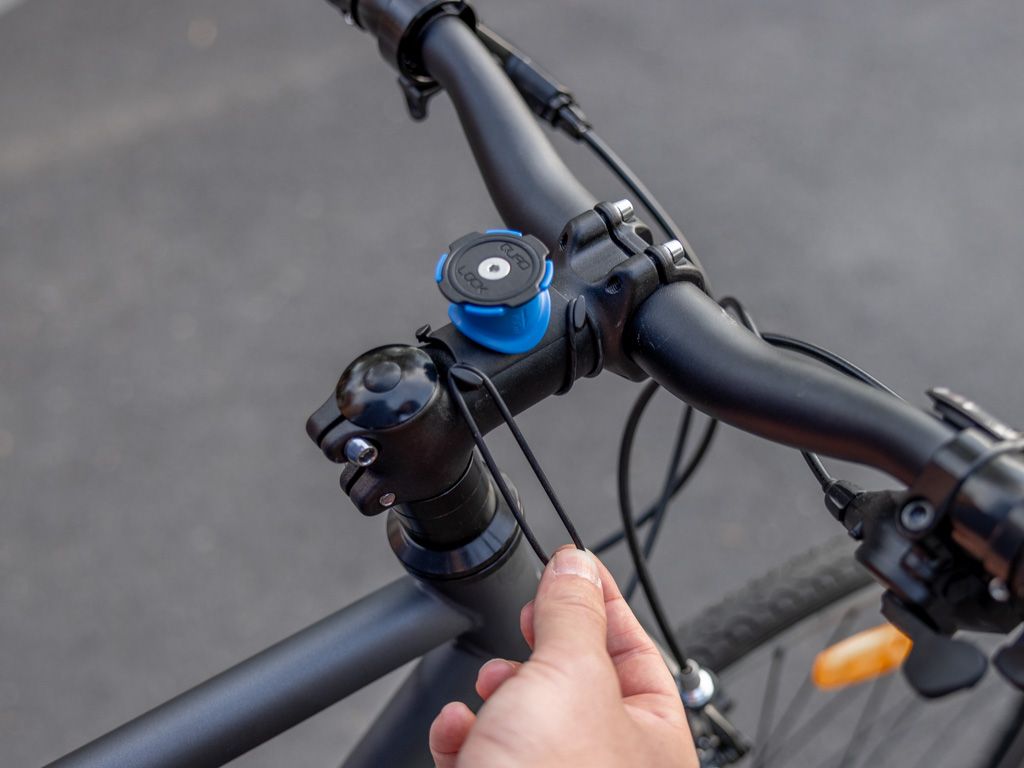
Installing the Quad Lock stem mount is a simple process that secures your phone in a central, stable position on your bike. This mount fits neatly on the stem, giving easy access to your device while riding. Follow the steps below carefully to ensure a firm and safe installation.
Removing Stem Cap
Start by loosening the bolt on the stem cap using an Allen key. Take off the stem cap carefully and keep the bolt safe. Make sure the area is clean and free from dirt before placing the mount.
Placing The Mount
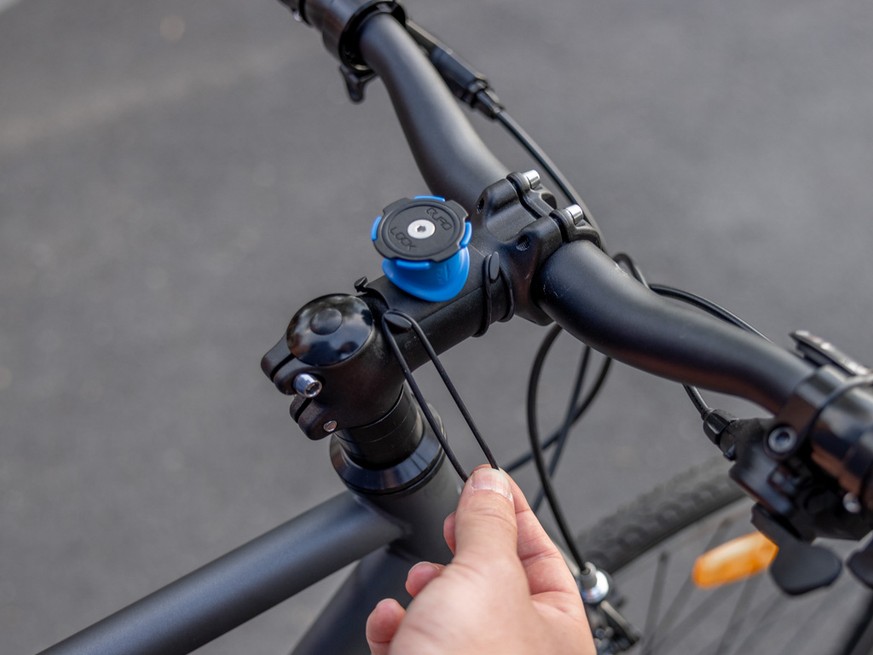
Position the Quad Lock mount over the stem where the cap was removed. Align the mount so it sits flat and centered. Some mounts include rubber shims; use them to ensure a snug fit if needed.
Reassembling And Tightening
Put the stem cap back on top of the mount. Insert the bolt and tighten it evenly using the Allen key. Avoid over-tightening to protect the stem and mount. Check the mount is secure and does not move.
Installing Fork Stem Mount
Installing the Quad Lock Fork Stem Mount is a simple way to secure your phone on your bike. This mount fits neatly into the fork stem tube, providing a stable and central position for your device. Follow these steps carefully for a safe and reliable installation.
Accessing The Fork Stem Tube
First, locate the fork stem tube on your bike. It is the vertical part that connects the handlebars to the front wheel. Remove any caps or covers on top of the stem. Use an Allen key or wrench to loosen the bolt holding the stem cap. Carefully take off the cap to access the hollow tube inside.
Inserting The Mount
Take the Quad Lock Fork Stem Mount and slide it gently into the open fork stem tube. Push it down until it sits firmly inside. Make sure the mount is straight and aligned with the bike’s frame. Avoid forcing the mount; it should fit snugly but smoothly.
Securing And Adjusting
Next, tighten the bolt on top of the mount using the Allen key or wrench. This action expands the mount inside the tube, locking it in place. Check if the mount is secure by gently pulling it. Adjust the angle of the mount so your phone will face you clearly. Finally, ensure the mount does not block your steering or other controls.
Attaching Phone To Mount
Attaching your phone to the Quad Lock bike mount is a simple process. It keeps your phone secure during rides. Proper attachment ensures safety and easy access to your device. Follow these steps to attach your phone correctly.
Aligning The Quad Lock Case
Hold your phone with the Quad Lock case facing the mount. Make sure the case’s locking tabs line up with the mount’s grooves. Position the phone above the mount at a slight angle. This helps the tabs slide into place smoothly. Avoid forcing the phone onto the mount.
Locking Mechanism Operation
Once aligned, press the phone down firmly. Twist the phone clockwise until you hear a click sound. This click means the phone is locked securely. Test the lock by gently pulling the phone upwards. The phone should stay attached and not move.
Adjusting Mount Position
Adjusting the mount position is a key step to ensure your Quad Lock bike mount fits perfectly. Proper adjustment helps you view your phone easily and keeps it secure during rides. Take your time to set the mount in the best spot on your bike.
Angle And Orientation
Start by setting the angle of the mount. Tilt it to face you directly for clear visibility. The mount allows rotation so you can use your phone in portrait or landscape mode. Choose the orientation that suits your riding style and phone use. Adjust the angle until you find a comfortable view without blocking your bike’s controls.
Checking For Interference
After adjusting the angle, check for any interference with bike parts. Turn your handlebars fully left and right. Make sure the mount or phone does not touch the brake cables, shifters, or other components. The mount should stay stable and not restrict your bike’s movement. Fix any tight spots by repositioning the mount slightly. Safety comes first when fitting the mount securely.
Removing The Mount
Removing the Quad Lock bike mount is simple and quick. It helps to keep your bike tidy when not in use. Follow these clear steps to safely take off the mount without any damage.
Unlocking The Mount
Start by holding the phone or device attached to the mount. Press the blue collar on the mount firmly. Twist the collar counterclockwise until it loosens. This action releases the locking mechanism. The device will then detach easily from the mount base.
Detaching From Bike
Locate the screws or clamps that hold the mount on the bike handlebar. Use the appropriate tool, usually an Allen key or screwdriver. Turn the screws counterclockwise to loosen them. Remove the mount carefully from the handlebar. Store the mount safely for future use or transport.
Credit: www.quadlockcase.com
Tips For Secure Installation
Installing your Quad Lock bike mount securely ensures your phone stays safe on every ride. A firm installation prevents wobbling and accidental drops. Follow simple tips to make the mount steady and reliable.
Using Included Shims
Quad Lock provides shims to fit different handlebar sizes. Place the shims between the mount and handlebar if the fit feels loose. They fill gaps and create a tight grip. Use the right shim size for your bike. This step avoids unnecessary movement during rides.
Regular Tightness Checks
Check the mount’s tightness often, especially before each ride. Vibration and bumps can loosen screws over time. Use a screwdriver or Allen key to tighten screws firmly. Avoid over-tightening to prevent damage. Keeping the mount secure helps protect both your phone and bike.
Frequently Asked Questions
How Do Quad Lock Mounts Work?
Quad Lock mounts use a dual-stage locking mechanism to securely attach your phone case to the mount. Twist your phone onto the mount until it clicks. The system allows quick attachment and release, keeping your device stable during rides or activities.
How To Attach Bike Lock Holder To Bike?
Attach the bike lock holder by sliding it onto the lock bracket. Secure with nuts and place the bracket on the bike frame. Use included shims if needed for a tight fit. Tighten all screws firmly to prevent movement during rides.
How To Get Quad Lock Mount Off?
To remove a Quad Lock mount, lift the blue collar and twist the mount to unlock it. Then, pull it off gently.
How To Install A Bike Mount On A Wall?
Mark the wall where you want the bike mount. Drill holes at the marks, insert wall plugs, then screw the mount securely. Hang your bike on the mount.
Conclusion
Installing the Quad Lock bike mount is simple and quick. Follow each step carefully for a secure fit. Check that the mount does not block your bike’s controls. Tighten all screws to keep your phone stable during rides. Enjoy easy access to your phone while cycling safely.
This mount offers convenience without hassle or extra tools. Now, you’re ready to ride with confidence and stay connected.